Dynamic Input is a command interface that contains the coordinates of a chosen point in the Cartesian coordinate system and the dimensions of the element under construction. The characteristic trait of this function is the form of dynamic input which appears near the cursor in the working area of the program at the moment of creating or editing an entity. As the cursor moves the data in the command interface are updated.
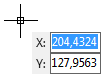
The displayed parameters of the form of dynamic input differ according to the chosen tool. For the first point of all the drawing instruments the form has only two parameters: X and Y, where the coordinates of the cursor are tracked dynamically if the values of these fields aren't fixed. You may select the starting point of an element with the help of the left mouse click or by entering the coordinates into the input field. Data entering must be confirmed with the help of the keys enabled in the dynamic input form:
Key Combination |
Function |
|---|---|
Tab |
switches to the next field and fixes the changes. - if there were no changes in the field it switches to the next field without performing any changes. - if the value in the field was changed, while switching to the next field it freezes the edited data. |
Shift+Tab |
switches to the previous field and fixes the changes. - if there were no changes in the field it switches to the previous field without performing any changes. - if the value in the field was changed, while switching to the previous field it freezes the edited data. |
Backspace |
releases a lock from the fields the values of which were frozen. It is also used for the forced block of the values irrespective of the fact whether they were changed or not. |
Enter |
confirms creating a point of the primitive. Takes the current values of the dynamic input form irrespective of the fact whether they were frozen or not. |
To finish entering the entity select the command Enter from the context menu. Switching on/off the feature is fulfilled in the Snap and Grid tab of the dialog box Options.
Go to ABViewer