The Show Point button (Viewer Tab -> Tools) provides the search of a required point in the drawing in the gnomon with given coordinates and fulfills its centering in the working area of the program.
Quick Access Panel: 
Ribbon: Viewer -> Tools -> Show point
Menu: Edit -> Show point
Enter X, Y and Z coordinates and the necessary scale factor into the arisen Show point dialog box. The field Scale is used for setting the scale in which the part of drawing containing the point will be displayed. By default the scale is equal to the current one. The coordinates can be entered either with the help of the keyboard or by scrolling the mouse after its pointing at the corresponding field. To increase the current value scroll the mouse wheel in the direction to yourself.
Press Show button. You will see the image displayed with the scale factor you set, and the point to be found will be located in the center of the drawing field, but please note that the point will not be highlighted in any way.
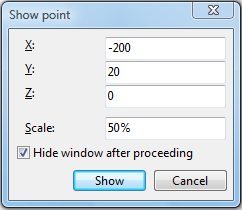
Hide window after proceeding - if this option is checked the dialog closes after the point has been found and shown on the screen. Unchecking the option allows to set the parameters more than once in a single session.
Coordinates must be set taking into account the positive or the negative character of the value (see mouse coordinates marked by the red circle in the status bar below):

Go to ABViewer