To select an entity click on it with the left mouse button. To select several entities
1. Hold the key Shift pressed and select the required entities with the left mouse click
2. Turn the mode Fast Entities Input on and select the entities.
3. Select the entities with the selection rectangle.
To select entities ignoring all the filtering properties choose the Select All  button or press Ctrl+A.
Using the Selection Rectangle
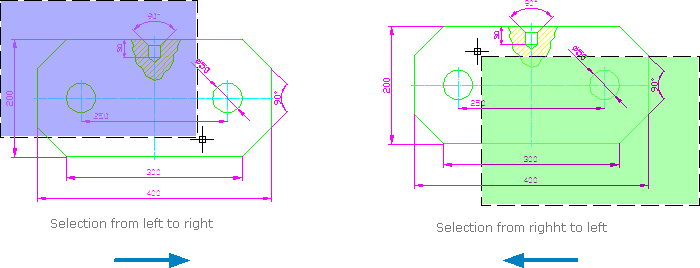
Specify the first point of the rectangle diagonal with the help of the left mouse click and holding the left mouse button pressed move the cursor of the mouse. A violet or green selection rectangle will appear. According to the direction of the cursor movement element selection after releasing the mouse button can be fulfilled in the following two ways:
•creating a selection rectangle from right to left. The color of the rectangle is violet. Only the elements that are entirely in the selection rectangle are selected.
•creating a selection rectangle from right to left. The color of the rectangle is green. All the elements that are crossed by the selection rectangle are selected.
Go to ABViewer