Ribbon: File -> Batch -> Batch Print...
File -> Print -> Batch Print...
Output -> Batch Print...
Menu: File -> Batch Print...
Command: BatchPrint
Batch Print is used to print a group of files. It enables you to set printing settings for each layout separately. To set the same printing parameters for several layouts meeting some criteria printing rules are used.
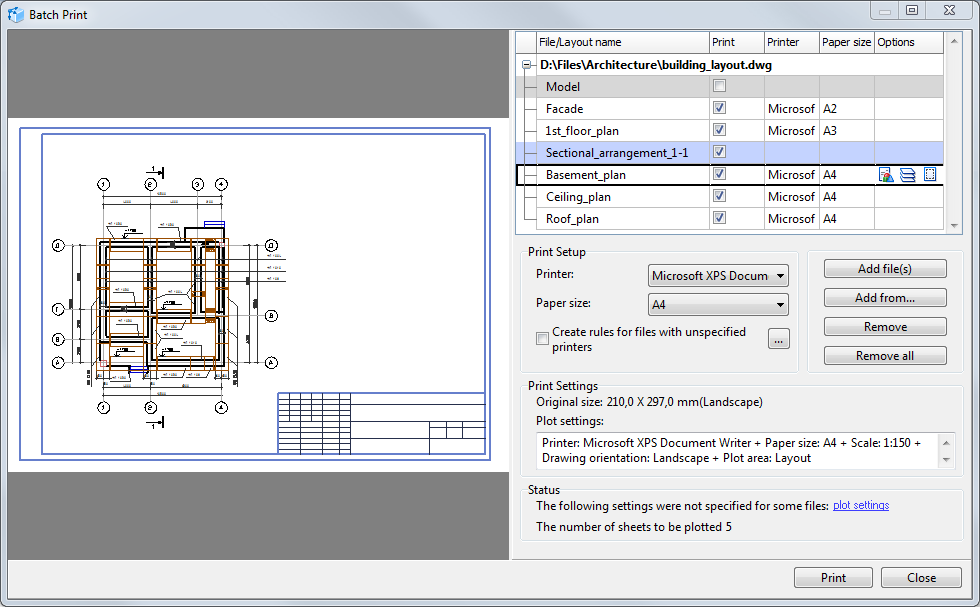
Preview Area
Previews the selected layout in such a way as it will be printed out. To preview layouts double-click the layout name in the file list.
List of Files for Printing
Shows the list of the loaded files and their status. The list has a hierarchical structure. Its first level is a path to the file, the second level is a list of layouts contained in the file. You can select layouts for printing in the file list as well as specify printing settings for each layout in particular. To set printing parameters for all layouts or a group of layouts, you can use printing rules.
Adding and Deleting Files to/from the List
To add and delete files use the buttons located under the file list.
[Add file(s)] Adds one or several selected files to the list. It calls the Open dialog box that allows filtering files by their extension. To select several files use Shift or Alt.
[Add from...]. Adds all files of the supported file formats from the specified folder. Calls the Browse Folders dialog box in which you should specify path to the folder with files.
[Remove]. Removes selected files from the list of files for printing.
[Remove all]. Removes all files from the list of files for printing.
Selecting Layouts for Printing
The Print column is used to select layouts that should be printed out. By default when files are added to the list, all layouts except for the Model layout are selected for printing.
The Select to print and Unselect commands from the context menu are used to select quickly all additional layouts or the Model layouts.
Selecting the Output Device (Printer, Plotter) and Paper Format
The Printer and Paper size columns are used to display paper format and name of the output device that will be used for printing. If these columns are empty, this means that the output device is not selected for the layout and it won't be printed out. If printing rules are applied to the layout, information about paper format should not be entered in the Paper size column while the Printer column displays the name of the rule in use.
Printing settings can be configured separately for each layout with the help of commands in the Options column or you can use printing rules applied to a group of files meeting selection requirements. Printing rules are applied to the layouts the printer of which is not set. By default printing rules are turned off. To set printing options fora group of files it is necessary to create a rule and after it turn on the Create rules for files with unspecified printers option in the Print Setup section.
In the Print Setup section the Printer and Paper size settings are used to set the output device fast for the selected layouts. Please note that after it you should preview the drawing as the printing area of the drawing is set in Plot settings and by default may be set in a wrong way.
Commands in the Options Column
When you select a layout, in the Options settings the commands used to configure printing settings are displayed. These options state with which scale the image must be displayed at the selected paper format.
 CAD files options. Calls the CAD file options dialog box for further setting of CAD files display. For example to turn on black and white printing option.
 Layers. Calls the Layers window. Allows changing layers options for all layers of the DWG or DXF file. Changes are not saved in the drawing file.
 Plot settings. Calls the Plot settings dialog box for selecting the output device and paper format. Other options in this dialog box set the printing area of the image that should be printed out, the output scale and printing area position in the layout of the selected format.
Highlighting of Files in the List with Color
If the layout is highlighted with color in the file list, it will not be printed out. The following colors are used:
|
the layout is excluded (the Print option is off) |
|
the list is selected for printing but the output device is not specified. When there are such layouts in the file list, the corresponding message will be displayed in the Status section. |
Print Setup
Displays printing settings for the selected layout and its original sizes. If a rule is applied to the selected layout, the name of the rule in use is displayed opposite to Plot settings.
Printer. Is used to set quickly the output device for the layout selected in the file list. The not installed value allows resetting the set printer so that the rules could be applied to the specified layout.
Paper size. Is used to select quickly the paper format which will be used to print the layout selected in the file list. The list of paper formats is available only after choosing the output device.
Create rules for files with unspecified printers. Turns on the usage of active printing rules. If you click the [...] button, the Rules for files with unspecified printers dialog box used for creating and editing rules will be opened.
Please note: in the Professional version, the number of files is limited by three files. The Enterprise version does not have any limitations.
Print settings
Displays printing settings for the selected layout and its original sizes. If a rule is applied to the selected layout, the name of the rule in use is displayed opposite to Plot settings.
Original size. Displays original paper size of the selected layout. The original paper size is logged in layouts settings of DXF, DWG, CGM and PDF files. The A4 paper format is always set for raster and some vector formats (PLT, DWF etc.).
Plot settings. Displays printing settings which the layout will have when it is printed. Printing settings can be set for the layout via plot settings or they can be used from the printing rules.
Status
Displays whether the file is ready for printing. If print settings and the printer are not set for the selected layouts, the following message will be displayed: "The following settings were not specified for some files: plot settings." The plot setting link leads to the first layout found in the file list for which Print settings have not been set. The section also displays the number of sheets to be plotted.
Print button
Prints the layouts in accordance with the specified printing settings.
Close button
Closes the Batch Print dialog box not clearing the file list. The file list is cleared after closing the program window.
Go to ABViewer