The command Ortho switches the mode of orthogonal drawing on/off.
Status Bar: 
Hotkey: F8
When this function objects are edited and linear entities are created strictly horizontally or vertically along the plane XY. The Ortho and the Polar tracking modes can't be used simultaneously, that's why while switching the Ortho mode on the Polar tracking mode is automatically switched off.
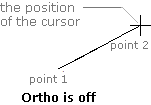
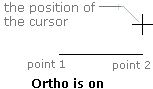
The set deviation angle from the X axis of the element under creation defines the angle explicitly and has a priority over the mode of orthogonal drawing.
Go to ABViewer