You need to register the program to work with it after buying ABViewer and getting the registration data. The license data which are sent to the specified e-mail address of the user are entered in the dialog boxABViewer Registration Dialog. To call it do the following:
1.Click on the button  in the right top corner of the program and select Register ABViewer... in the drop down list. In the classical ABViewer menu the command can be accessed by selecting Help > Register ABViewer....
2.In the opened dialog box enter the registration data:
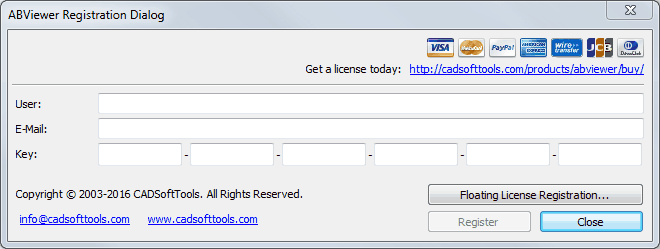
Name. The field is necessary to be filled in. You can enter any name. It doesn't depend on the one specified in the registration data.
•E-Mail. The field is necessary to be filled in. You can enter any e-mail. It doesn't depend on the one specified in the registration data.
•Key. The key must correspond with the one specified in the registration data sent to your mailbox.
3. Press the Register button.
Press the Trial button if you are only evaluating the program. The evaluation period lasts 45 days. The number of the left days is displayed in the dialog box ABViewer Registration Dialog on the left under the dialog title. If the trial period is over the dialog box ABViewer Registration Dialog will appear every time after running the program and pressing the Trial button will lead to closing the program.
Go to ABViewer