Saving a drawing as HPGL/2 you will have several options to choose from considering the output you would like to get.
After selecting the menu option 'Save' or 'Save as...' with HPGL/2 selected as the export format you will see the following window appear:
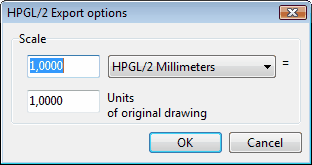
It specifies size parameters of the drawing (image) to be converted to HPGL/2 file format.
•HPGL/2 units - defines the number and type of output parameters:
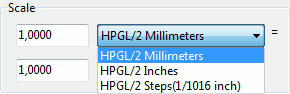
•Units of original drawing - defines a portion of input drawing's units respective to the specified HPGL/2 units parameter:

Some applications are very sensitive to the contents of HPGL/2 files. For example if source CAD file contains a spline, after converting to HPGL/2 this spline thill get zigzag outline. HPGL/2 Export options dialog allows to overcome this trouble. It is necessary to set maximum available correspondence of the drawing units to its output size.
Go to ABViewer