While exporting the current file to BMP, JPEG, GIF, TIFF and PNG the Export file size dialog box containing conversion settings is called by default. The call of this dialog box during saving to the raster formats can be switched off. To switch it off in the Settings window in the Converting tab select one of the following options: saving with actual size or saving with maximum size.
To export files to BMP, JPG, GIF and TIFF do the following:
1. Create a new file or open an existing file which you need to save to raster format.
2. Select File -> Save as or use the Ctrl+Shift+S hot key.
3. In the standard Save as dialog box select the required export folder, enter the output file name in the File name field, select the required formst (Bitmap Files (*.bmp), JPEG (*.jpg,*.jpeg), GIF (*.gif) или TIFF (*.tiff)) in the Save of type drop-down list.
4. Click OK.
5. After it the Export file size dialog box is called. By default the Actual size option is set in this dialog box. In other words, the sizes of the output file correspond to the current display scale factor.
6. If required edit settings. Click OK to save the file.
Note: depending on the export file format, the Export file size dialog box can have a set of different parameters
Export File Size for the Copy as BMP Command
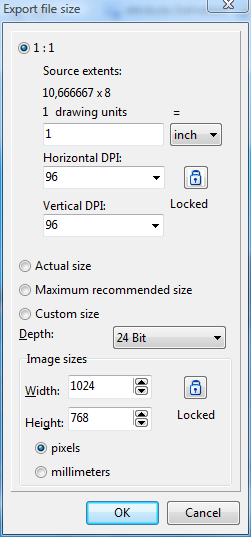
•1:1 - sets sizes equal source file extents. DPI (dots per inch) is a value used to describe the resolution of the image. It can have different values horizontally and vertically and is used only for raster images. By default it is equal to 96 but it is possible to select another value from the drop down list. The higher is the DPI value the better is the quality ant the bigger is the file size.
•Actual size - sets sizes according to the current scale of the loaded image.
•Maximum recommended size - sets maximum size which will not cause possible system's slowing down while converting (size values depend on system resources)
•Custom size - user defined size. It is recommended to check Maximum recommended size previously.
•Depth defines the maximal number of colors that can be used in the drawing of this type by showing the bits quantity used to present each color. The higher is the depth value the bigger is the file size. The depth is expressed by bits per pixel, bpp. By default the depth is equal to 24 Bit. The values 1 Bit, 4 Bit, 8 Bit, 24 Bit and 32 Bit are also possible.
1 Bit |
The image is presented in black and white. |
4 Bit |
Has 16 colors. |
8 Bit |
Contains 256 (8x8x4) different colors. Three bits are used for Red and Green and 2 bits per pixel are used for Blue. |
24 Bit |
Truecolor is the color that resembles the colors of the real world.It contains around 16,8 million different colors and uses 8 bits to present Red, Blue and Green each. |
32 Bit |
Has a supplementary 8-bit channel that can either be empty or contain data about the transparency of the image in definite pixels. |
As the formats EMF and WMF are Windows metafiles the parameter Depth is absent for them.
•Transparency is present only when saving as GIF. One of the colors of the palette that is used as the background color is set as transparent. Thus the background will be seen through the pixels of this color.
Go to ABViewer