The Favorites button shows or hides the panel Favorites.
Quick Access Panel: 
Ribbon: Advanced -> Window -> Favorites
Menu: View -> Favorites
The Favorites panel displays the list of favorite files, allows to open them in the program window and make a selection for sending files to batch. By default the Favorites panel is located in the bottom left corner of the application. It is a dockable, resizable window. To move it left-click the mouse on the heading of the panel and holding the button pressed move the panel with the mouse to any place you like. To fix the panel at the edge of the window move the panel in the corresponding direction until you see a part of the window highlighted with blue. Release the button.
The Favorites Panel contains a list of supported files that interest you. It shows the name of the file and the path to it. The name of the file is specified by the user and doesn't affect the file name in the directory. If a file was moved to another folder, the path in the list will remain the same. To open it correctly after moving it is necessary to update the path to it in the favorites list. Double-click on the necessary file in the Favorites panel to open it in the drawing field.
The last added file is marked by red.
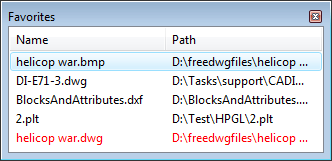
You can set the style of favorites so that it is similar to the bookmarks in Internet Explorer (TM). In this case the name of the file in the list will be underlined when the cursor points at it and the drawing will open by a single click on it. You can set the Favorites Style in the dialog box Options under the tab Common.
Go to ABViewer