Ribbon: Editor -> Tools -> Bring to front/Send to back
Menu: Tools -> Display order ->Bring to front/Send to back
The Bring to front  button brings the selected entity to front against other entities. This will make the entity fully visible - without any other entities overlapping it. The Send to back
  button allows to move the selected entity to back against other entities of the drawing. Thus, some other entities may overlap it.
The display order of the selected entities after using these commands depends on the order of their selection. The first selecte4d object will be displayed in the background relative to the other selected objects. For example,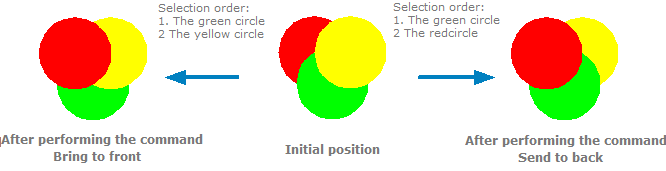
Note: The objects are selected from the image with the initial position of colored circles.
Go to ABViewer