The Explode button breaks connections between entities inside of a complex object (block).
Quick Access Panel: 
Ribbon: Editor -> Instruments -> Explode
Menu: Tools -> Modify -> Explode
All entities inside the block having properties (color, linetype etc.) equal to By Block may change them when using Explode tool.
Example:
•Create a new drawing: select File -> New.
•Add a simple set of entities:
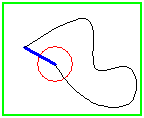
set the Color and the LineWeight properties for spline equal to By Block
•select the entities to be added as a block using Ctrl + A keys or using the mouse (click over entities with the Shift key pressed);
•press the Copy  button (Edit -> Copy) to copy the selected entities to the Clipboard;
•press the Paste as Block  button (Edit -> Paste as Block) to paste the copied entities as block;
•set the block properties as Color - Purple, Line Weight - 1,58:
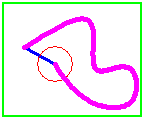
as a result the color and the lineweight of the spline have changed according to the set block properties
•select the new block and press the Explode button (Editor Tab -> Instruments -> Explode):
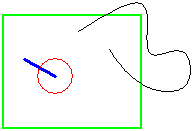
the spline gets its original properties and the entities can be moved separately which was impossible when they were united into a block.
Go to ABViewer