The Text Styles button allows to manage text styles which are used for the current file.
Quick Access Panel: 
Ribbon: Editor -> Text -> Text styles...
Menu: CAD Files -> Text styles...
The Text style dialog box is used to create, edit and delete text styles as well as to set the current text style.
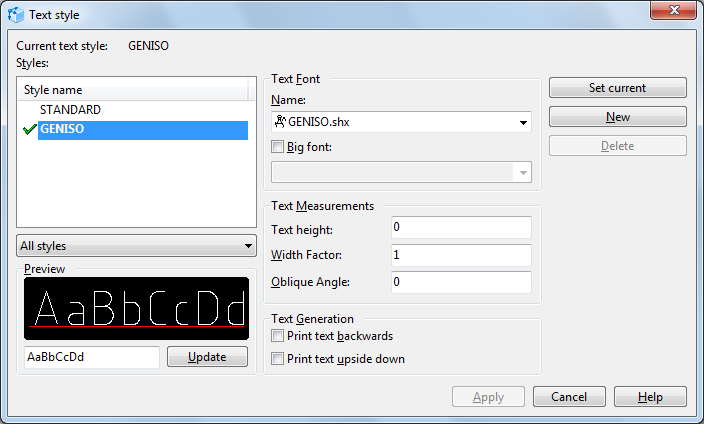
Current text style. Displays name of the current text style. On default the GOST style is used as the current one.
Styles. List of styles of the current drawing. The current style is marked with the green tick.
•To set the style as current select it with the left mouse button and click the Set current button or select the Set Current command from the context menu.
•To rename the style select it from the list with the left mouse button. Click it with the right mouse button and select the Rename command from the context menu.
•To delete the text style select it from the list with the left mouse button and click Delete or select the Delete command from the context menu.
•It is impossible to delete the following styles: the STANDARD text style, the current text style and the style that is used in the current drawing.
Style list filter. Controls the display of styles in the list for the current drawing.
•All styles. All text styles are displayed in the Styles list.
•Styles in use. Only the styles that are used in the current drawing are displayed in the Styles list.
Preview. Preview of the text string that displays the results of settings configuration of the selected text style. To enter a text string use the field under the preview area.
Text font. Sets the font in use for the selected text style. Changes applied to the existing text style will affect all the text objects that use this text style.
•Name. The list of the registered TrueType and SHX fonts located in the custom fonts search folders. If the font used in the drawing doesn't exist in the system, its name in the Name field will be marked as red and it will be automatically changed to another font. Alternative font for usual and big SHX fonts is set in the Fonts category of the Options window. On default simplex.shx is used as alternative for usual SHX fonts while bigfont.shx is used for big SHX fonts.
•Style. Sets type face of the selected TrueType font: Regular, Italic, Bold, Bold italic. This option is not available for SHX fonts and is replaced by the Big font option.
•Big font. Switches on the usage of big font for Asian languages. The option is used together with the regular SHX font and includes the file list of big SHX fonts.
List of standard big fonts included in the program:
Font name |
Description |
Code page |
bigfont.shx |
Japanese font |
932 |
chineset.shx |
Traditional Chinese font |
950 |
gbcbig.shx |
Simplified Chinese font |
936 |
whgdtxt.shx |
Korean font |
949 |
whgtxt |
Korean font |
949 |
whtgtxt.shx |
Korean font |
949 |
whtmtxt.shx |
Korean font |
949 |
Text Measurements. Settings to change the default text height, width factor and oblique angles.
•Text height. Text height of single-line texts. This setting is used to change automatically the single-line height that is used in this style. If the height value is set as 0, the default text height will be set in accordance with the value set in the Properties panel (when no entity is selected). If the set value is greater than 0, the text height will be set by style.
•Width factor. Stretching or compressing degree of characters. Values less than 1 compress the characters. Values greater that 1 stretch the characters. Values less than or equal to 0 are forbidden.
•Oblique Angle. The angle of characters incline. The range of angle values lies from -85 to 85 inclusively.
Text generation. Setting the used font fpr the selected font style. Changes of parameters applied to the existing text style will affect all text objects using this text style.
•Print text backwards. Reflects characters left to right.
•Print text upside down. Displays reversed characters.
Set current. Sets the selected text style as current.
New. Creates a new text style based on a selected one. This command calls the New Text Style window in which the name of a new style must be entered.
Delete. Deletes the text style that is not in use. It is impossible to delete the STANDARD style, the current text style and the style used in the current drawing.
Go to ABViewer