The tab has the settings that allow to use SHX fonts in the drawings. The paths of SHX fonts search are set.
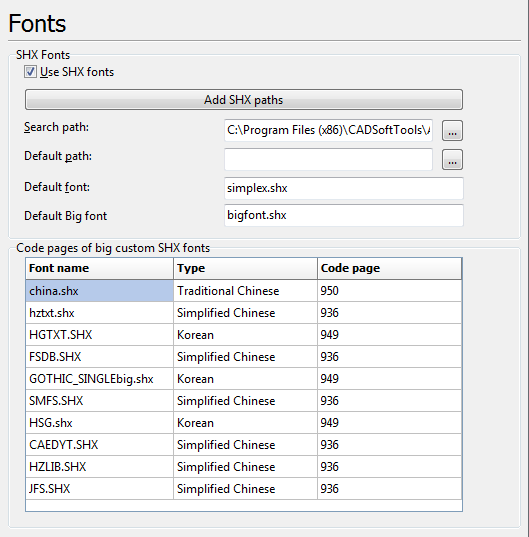
Use SHX Fonfs - allows ABViewer to use SHX fonts installed into the system (SHX fonts are required for many DWG/DXF files).
•Add SHX path - allows adding SHX paths registered on the computer. If AutoCAD is not installed on the computer the path to the fonts folder supplied by ABViewer is added by default.
•Search path - contains a list of SHX fonts paths where the search for SHX fonts is performed. The path can be entered manually (as a separator ";" is used) or selected in the dialog box
Directories. Pressing the button  on the right from the Search path edit box calls Directories dialog window.
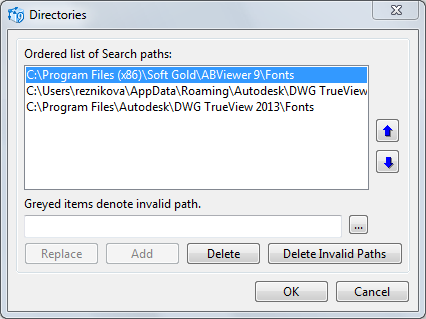
This dialog box allows managing a list of SHX fonts paths. Invalid paths are marked with the grey color. Clicking on the Delete Invalid Paths button allows deleting invalid paths. The selected path can be deleted or relaced with a new one. To add a path you should first define the path top it in the input field and then pres the Add button.
•Default path and Default font - defining the default name and path for SHX font. By default simplex.shx font is used.
▪Default Big font. A font used as an alternative one for big SHX fonts if the original SHX font is not found in the paths defined in the list. The bigfont.shx font is used as an alternative font on default.
Code pages of big custom SHX fonts
To use big SHX font characters (Asian characters) it is necessary to specify usage of the big font in text styles. But to convert big custom SHX fonts to Unicode characters correctly the code page must be specified. Code pages for custom files of big SHX fonts are specified in the table.
▪Font name. Name of the SHX font with its extension. The name can be entered using the keyboard or the user can select the required font in the Open dialog box that opens when the [...] button is pressed.
▪Type. Selection of the code page from the list by type: Japanese, Traditional Chinese, Korean, Simplified Chinese. When the type is changed, the code page also changes.
▪Code page. Selection of the code page from the list: 932, 950, 949, 936. When the code page is changed, the type also changes.
The program includes the following standard files of big fonts the code pages of which are set programmatically.
List of Standard Fonts |
||
Font Name |
Description |
Code page |
bigfont.shx |
Japanese font |
932 |
chineset.shx |
Traditional Chinese font |
950 |
gbcbig.shx |
Simplified Chinese font |
936 |
whgdtxt.shx |
Korean font |
949 |
whgtxt.shx |
Korean font |
949 |
whtgtxt.shx |
Korean font |
949 |
whtmtxt.shx |
Korean font |
949 |
Note: you can download the set of additional SHX fonts at: http://cadsofttools.com/downloads/
Go to ABViewer