The Arc button allows to draw an arc by specifying the starting point, the endpoint and the height of the chord.
Quick Access Panel: 
Ribbon: Editor -> Draw -> Arc
Menu: Draw -> Arc
To add an arc
1. Click on the button .
2. Specify the starting point with the left mouse click or enter the coordinates via the dynamic input.
3. Move the mouse cursor and specify the end point.
4. Drag the pointer for defining the convexity of the arc.
5. Click when done.
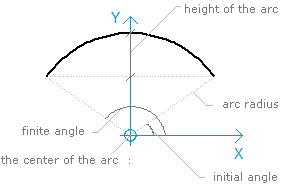
An arc has a set of properties which can be viewed and edited in the Properties panel:
Property |
Description |
|---|---|
Color |
Defines the color of the arc |
Layer |
Defines the layer which the arc belongs to. The property contains a list of all available in the drawing layers and allows to move the arc to another layer. |
Line Weight |
Defines the lineweight of the arc. Is selected from the standard values. You can turn the function of showing the lines according to their lineweight on or off. Each lineweight value corresponds to a number of pixels on the screen. The number of these pixels isn't changed while scaling in the program window. The scale of lineweighht display on the screen is set in the Visualization tab of the Options window. |
Linetype |
Defines the linetype of the arc. Is selected from the standard values. |
Linetype scale |
Sets the scale for the current linetype. By default it is 1. |
Point |
Sets the coordinates of the center of the arc. |
Radius |
Sets the value of the radius of the arc. |
Height |
Sets the value of the height of the arc. |
EndAngle |
Defines the maxcimal angle between the end point of the arc and the axis OX on the trigonomeric circle. The direction of the axis X from the center of the arc is accepted as the beginning for the angle reading. Angle reading is performed counterclockwise. |
StartAngle |
Defines the minimal angle between the end point of the arc and the axis OX on the trigonomeric circle. The direction of the axis X from the center of the arc is accepted as the beginning for the angle reading. Angle reading is performed counterclockwise. |
Length |
Shows the length of the arc. Is unavailable for editing. |
Area |
Shows the area bordered by the arc. Is unavailable for editing. |
Go to ABViewer