Block attributes are available for editing through the respective dialog box. Please follow the instructions to enter the attributes editing mode:
•use left mouse click for selecting a block;
•right mouse click and to select Edit attribs item in the appeared popup menu;
•perform necessary changes in the Edit attribs dialog:
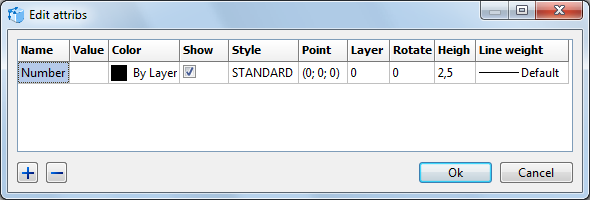
Name is the name of the attribute. It is not available for editing.
Value is the displayed information of the attribute which is connected with the block name. Attribute values are the data which are extracted from the file while making a report.
Color is the attribute color in the drawing. When the value By block is selected the color will be defined according to the block color.
Show sets the visibility of the attribute in the drawing. If it is not checked the attribute won't be displayed, but can be used.
Style parameter allows selecting one of the available text styles. The text styles list is also available under CAD Files -> Text Styles... menu item.
Point is the point of attribute insertion. It may be changed in the following ways:
•left click in the respective point coordinates field and press  button which appeared on the right and enter the coordinated in the dialog box.
•press Select point button; both dialog boxes disappear opening a drawing, left mouse click in the drawing for a new insert point.
Layer sets the layer where the attribute will be.
Rotate is the rotation angle of the attribute in the XY plane.
Height is the text height of the attribute.
Line is the lineweight of the attributes which use an SHX fonts.
Adding and Deleting Attributes.
Adding and deleting attribute is possible only with the help of the dialog box Edit attribs. But it is not possible to delete attributes which were connected with a block at the moment of its creation. To add and delete attributes use the buttons [+] and [-] which are in the left bottom corner of the dialog box Edit attrbs.
Go to ABViewer