Specifies parameters for printing CAD files.
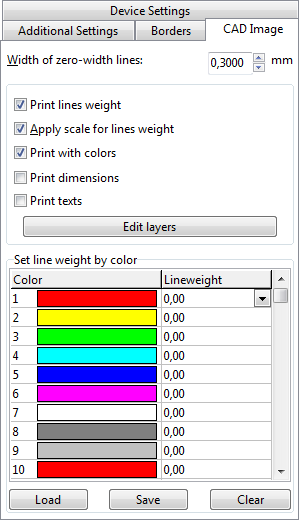
❑Width of zero-width lines
Specifies the width of the lines, which have a width equal to zero, in chosen units (inches or millimeters) for printing. All primitives with null-width will be printed with the width equal to the entered value.
❑Print lines weight
If it is checked all primitives with null (zero) width will be printed with the width equal to the one entered in the edit box Width of null-width lines, and all primitives with zero-width will be printed with the width of 1 pixel.
❑Apply scale for lines weight
Use this property to scale lines weight according to the drawing's (image) Scale factor.
❑Print with colors
Displays the drawing (image) in the colors or black-and-white mode.
Note: use black-and-white mode for printing if you use black-and-white printer and want to have all the lines with the same weight and intensity.
❑Print dimensions
Allows to print dimension entities if they exist.
❑Print texts
Allows to print text entities if they exist.
❑Edit layers - calls Layers dialog.
In CAD color system each color is identified by an AutoCAD Color Index (ACI) number, an integer from 1 to 255. Standard color names are available only for colors 1 to 7. These colors are names in the following way: 1 Red, 2 Yellow, 3 Green, 4 Cyan, 5 Blue, 6 Magenta, 7 White/Black.
This option allows manual definition of the line weight according to its color.
❑Press Save... button to save already made settings.
❑Press Load... button to load previously saved settings (file with CWS extension).
Go to ABViewer