The tab contains settings determining the action which will be fulfilled when saving the current drawing into a file and copying the image to the clipboard. The settings affect conversion and saving only into raster formats and metafiles.
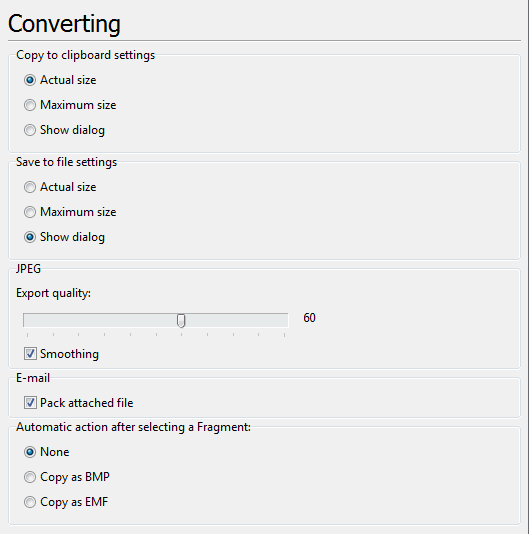
Copy to clipboard settings
The Copy to clipboard settings section defines the conditions for copying loaded images to the clipboard when the Copy as BMP command is used.
•Actual size - the currently loaded image will be copied to the clipboard with its actual size.
•Maximum size - the currently loaded image will be copied to the clipboard with its maximum available size.
•Show dialog - when coping an image to the clipboard with the help of the Copy as EMF or Copy as BMP commands the Export file size dialog will be called. You will be able to set the sizes and the quality of the output file there.
Note: the image is always copied to the clipboard with the maximum available size when the Copy as EMF command is used.
Save to file settings
The Save to file settings section defines the size of the file saved to a format:
•Actual size - the currently loaded image will be saved into a raster format or metafile with its actual size.
•Maximum size - the currently loaded image will be saved into a raster format or a metafile with its maximum available size.
•Show dialog - when saving Export file size dialog will be called. You will be able to set the size and the quality of the output file there.
JPEG settings
The JPEG settings section defines the conversion quality for JPEG file format
•Export quality is used to define the compression quality of the output image. It may range from 0 to 100. A higher compression may result in a poorer picture quality, but a smaller file size. The default value is equal to 60.
•Smoothing is used to determine whether the JPEG image is displayed in small blocks or with blurred edges. If Smoothing is checked the edges are blurred during progressive displaying of the image. If Smoothing is unchecked raw blocks of color are used to display the image.
•Pack attached file allows to pack the file automatically into a ZIP-archive when sending via e-mail.
Automatic action after selecting a Fragment
Selection of the action which will be implemented automatically after the use of the instrument Fragment.
•None. After selection of the part of the drawing with the help of the tool "Fragment" automatic actions are not executed. The action necessary to execute with the selected fragment is selected from the context menu of the instrument.
•Copy as BMP. It copies the selected fragment to the clipboard as BMF.
•Copy as EMF. It copies the selected fragment to the clipboard as EMF.
Go to ABViewer