Status bar is an information bar, which can't be relocated or hidden. It is always in the bottom part of the program and contains additional information and functionality:
•the name of the opened file
•its sequence number and the total number of files in the folder
•a block with additional modes of drawing
•coordinates under the mouse cursor
•dimensions of the active file (x;y;z).
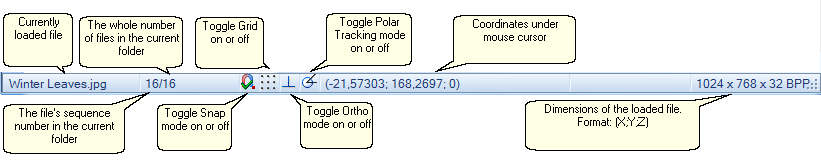
The block with additional modes of drawing contains four buttons: Grid, Snap, Ortho and Polar tracking. A green tick over the button means that this mode is on. Switching the modes on/off is fulfilled with the help of the left mouse click.
Right click over one of the following  icons in the status bar calls the pop up window:
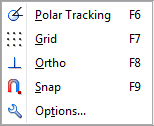
oPolar Tracking [F6]  switches polar tracking mode on or off.
oGrid [F7]  - switches grid on a drawing on or off.
oOrtho [F8]  - switches orthogonal drawing mode on or off.
oSnap [F9]  - switches snap mode on or off.
oOptions... - opens the respective tab of the Options dialog box which allows to change the parameters of the selected tool.
Go to ABViewer